Combine scanned documents into one PDF, free
Scanners and phone apps love producing one file per page and one PDF per session. Merge every batch into a single document, put the pages in reading order, and straighten the ones that came in sideways.
Combine your scans now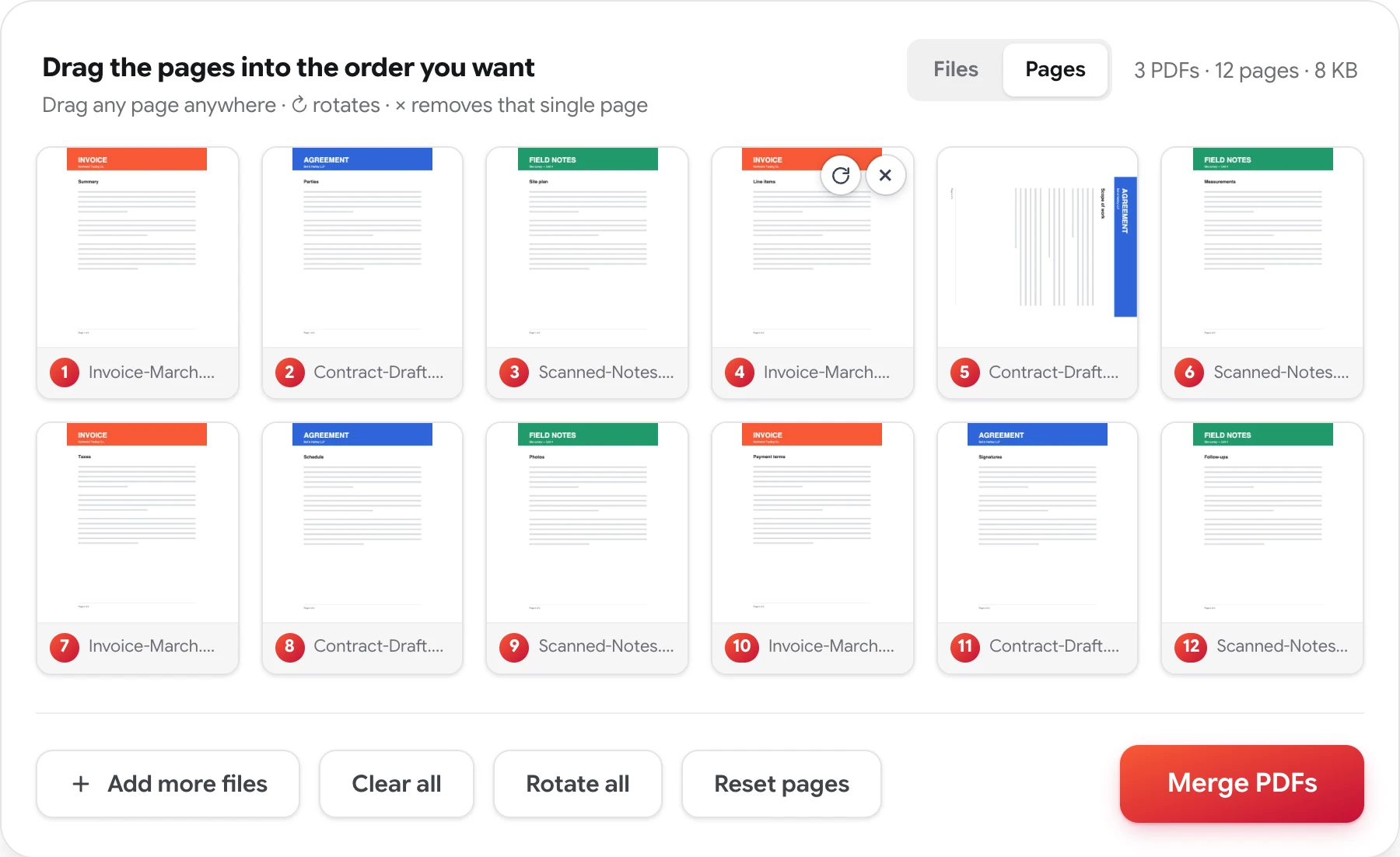
How to combine scans into one PDF
Four steps, no account, nothing to install.
-
Add every scan
Batches, single pages, separate sessions — drop in up to 50 PDFs at once.
-
Put the files in order
Drag the cards into sequence. If whole files are all that's wrong, you're already done — skip to merge.
-
Fix the pages that need it
Switch to Pages: rotate the sideways ones, delete blanks and duplicates, and drag any page anywhere — including between batches.
-
Merge and download
Press Merge PDFs and download one clean document, with every page exactly as it was scanned.
Scans never arrive as one tidy file
Scanning hardware has its own ideas about how a document should be organized. Flatbeds produce a file per page. Phone apps produce a PDF per session, so one contract becomes four files. Single-sided scanners handle double-sided paper by making you feed the stack twice — fronts in one file, backs in another, usually in reverse. And somewhere along the way a blank page or a second copy of page three sneaks in.
The result is a folder that contains a complete document in pieces. Merging stitches the pieces back together: add every file, and if the batches themselves are in order, one press does it. When the mess is deeper, the Pages view opens every batch into individual pages on one grid — drag the pages into reading order (fronts and backs interleave exactly this way), straighten the sideways ones, and drop the blanks before you download.
Quality survives untouched — pages are copied as-is, images keep their resolution, and nothing gets recompressed or watermarked. And since scans are usually contracts, IDs, and records: the documents you combine are never stored, reviewed, or shared, and no copy of the result is retained. The privacy policy has the details.
Related: organize a PDF page by page · merge tax PDFs · merge PDF files
Combining scanned documents — FAQ
My scanner made a separate PDF for every page — can I combine them?
Yes. Add up to 50 files at once — one-page scans included — drag them into order, and merge them into a single document. Phone scanning apps that produce one PDF per session are the same story.
I scanned the fronts first and then the backs — can I interleave them?
Yes. Switch to Pages and every page from every file sits on one grid, so you can drag the back sides in between the front sides until the document reads 1, 2, 3. Pages from different files can be alternated in any order.
Can I fix pages that scanned sideways or upside down?
Yes. Each page has a rotate button that turns it 90 degrees at a time, and Rotate all turns the whole batch at once. Blank pages the scanner added can be deleted the same way, page by page.
Will my scans lose quality when they're combined?
No. Pages are copied into the merged file exactly as they are — images keep their resolution, nothing is recompressed, and no watermark is added. The combined PDF looks precisely like the scans that went in.
Turn the pieces back into a document
Free, private, and done in seconds — no sign-up, no watermarks.
Combine your scans now